Cross-site request forgery: A complete guide to understand CSRF vulnerabilities
Cross-Site Request Forgery (CSRF) allows attackers to trick a victim's browser into performing unauthorized actions—such as changing passwords or updating account details—without their knowledge. The potential damage from CSRF is significant, notably when exploited in tandem with other security weaknesses to create more complex attack vectors.
In this guide, we analyze CSRF vulnerabilities and how they work. We’ll walk through the primary types of these flaws and demonstrate how they are identified and exploited.
What is a CSRF Attack?
In a CSRF attack, a malicious website tricks a user's browser into performing an unwanted action on a trusted site where the user is currently logged in.
The attack relies entirely on the specific behavior of web browsers regarding Cookies. When a browser makes a request to a domain (e.g., yourbank.com), it automatically includes all cookies associated with that domain, even if the request originated from a different site (like payclient.co or malicious-site.com).
The Scenario: Session-Based Auth (Stateful)
Stateful API
A stateful API keeps per-user session data on the server—typically in memory or a backing store—and identifies each client with a cookie that points to that session record. Because the server remembers who you are between requests, the browser can simply resend that cookie and the server will reconstruct the user’s context, which is exactly the behavior that CSRF attacks exploit.
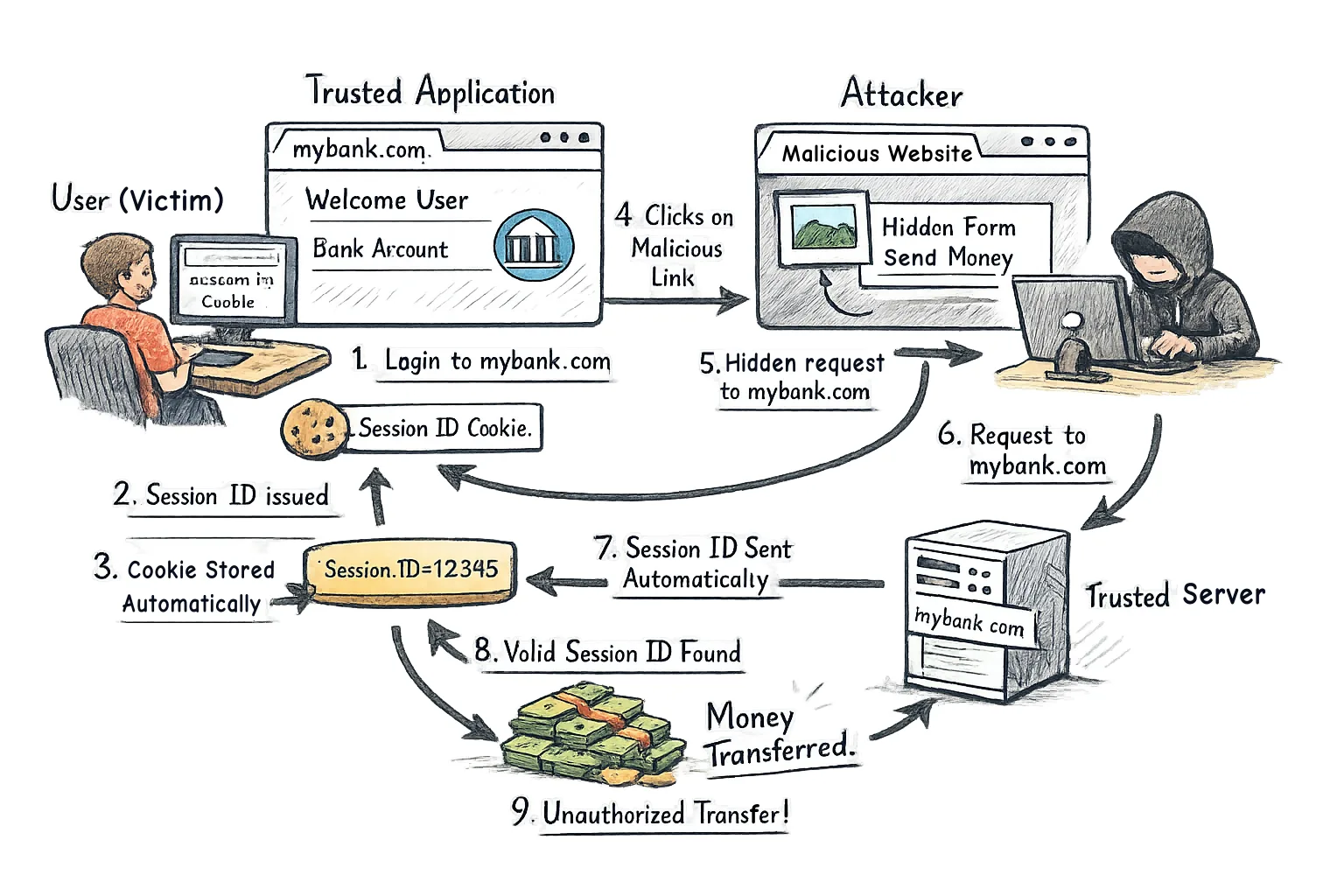
Here is a detailed CSRF attack scenario step by step:
- A User (Victim) successfully logs into the Trusted Application (e.g.,
mybank.com), which uses Session/Cookie-based authentication. - The server validates the login and creates a session record. It sends a response to the browser containing a Session ID stored in an HTTP Cookie.
- The browser stores this cookie and, due to historical web standards, is programmed to automatically attach this cookie to every single subsequent request made to
mybank.com, regardless of the request's origin. - The User leaves the bank tab open and is lured to a Malicious Website (e.g.,
evil.com) controlled by the Attacker. - The Malicious Website's HTML contains a hidden form or an embedded resource (like a zero-pixel image) that is coded to send a state-changing request (e.g.,
POSTtomybank.com/transfer_money) to the Trusted Application. - The browser, upon executing the code on
evil.com, initiates the request tomybank.com. - The Attack Vector: The browser sees the destination is
mybank.comand automatically includes the Session ID cookie (set in step 2) with the attacker's request payload. - The Trusted Server receives the request, examines the cookie, finds a valid Session ID belonging to the User, and authenticates the request as legitimate.
- The server processes the malicious action (e.g., executes the unauthorized money transfer), as it believes the logged-in user intentionally submitted the form. The damage is done, even if the user never saw the transaction.
CSRF Protection & Mitigation
1. Using a stateless server with JWT
In this setup, the server does not store a session. Instead, it issues a JSON Web Token (JWT).
Here is why this is considered a secure way to prevent CSRF attacks:
- Storage Location: JWTs are typically stored in the browser's
localStorageorsessionStorage(not cookies). - An attacker’s site cannot access your
localStoragedue to the Same-Origin Policy (SOP). - Transmission Method: When the frontend (React, Angular, Vue, etc.) wants to make a request, it must manually grab the token from storage and attach it to the HTTP header (usually
Authorization: Bearer <token>). - Browser Behavior: Browsers do not automatically attach
Authorizationheaders or read fromlocalStoragefor cross-origin requests.
The Result: If a user visits malicious-site.com, and that site tries to send a request to your API, the browser will send the request without the JWT. Since the browser doesn't automatically attach the token (like it does with cookies), the request arrives at your server anonymously and is rejected (401 Unauthorized).
Why didn't we entirely replace cookies by JWT?
If we used only header-based JWTs with no cookies:
- Users logging in at
app.example.comcouldn’t be auto-signed intobilling.example.com, because that second subdomain can’t read the first SPA’slocalStoragetoken. We must prompt for credentials again before minting a JWT forbilling. - Long-lived sessions would rely on tokens stored in JavaScript-accessible storage; a single XSS bug could steal the refresh token, so you’d need to rebuild the protection HttpOnly cookies already give you.
- Any third-party widget (say embedded Stripe Checkout) that expects to read an HttpOnly session cookie would treat everyone as logged out, forcing cumbersome workarounds.
Remember
Only the origin that set a cookie (its domain + subdomains) can receive it back on requests, so no other site can read or intercept it.
The browser enforces this as part of the HTTP cookie spec: every request includes a Host header, the browser checks the cookie jar for entries whose domain attribute matches that host (or its parent), and only those are attached to the Cookie: header.
httponly cookie
An HttpOnly cookie is still sent with matching HTTP requests, but the browser refuses to expose it to JavaScript. That blocks document.cookie access (and XSS-stealing), while the server still sees the cookie on every request.
2. CSRF Tokens & Identity Binding
The Synchronizer Token Pattern is the industry standard here.
The Synchronizer Token Pattern (STP) is essentially a "secret handshake" between the client and the server. Its goal is to ensure that a state-changing request (like a password change or a bank transfer) was intentionally initiated by the user from within the legitimate application, rather than triggered by a hidden script on a malicious site.
The security of this pattern relies on the Same-Origin Policy (SOP). While an attacker can send a request to your server, the browser prevents the attacker from reading the response or the contents of your site. Therefore, they cannot "steal" the token to use it in their attack.
Mechanism
Here is a step by step breakdown of how this mechanism works:
1. Token Generation
When a user logs in or starts a session, the server generates a unique, cryptographically strong random string (the CSRF token).
- Storage: The server stores this token in the user's session data (on the server-side).
2. Delivery to the Client
The server embeds this token into the HTML of the page it sends to the user. This is usually done in one of two ways:
- Hidden Form Field:
<input type="hidden" name="csrf_token" value="abc123xyz..."> - Meta Tag:
<meta name="csrf-token" content="abc123xyz...">(often used for AJAX/SPA apps).
This is the step where SOP comes in and protect the malicious read of this embedded token.
3. Submission of the Request
When the user submits a form or performs an action:
- In Forms: The browser automatically includes the hidden field in the POST body.
- In AJAX/APIs: JavaScript reads the token from the meta tag and attaches it as a custom HTTP header (e.g.,
X-CSRF-Token: abc123xyz...).
4. Server-Side Verification
The server receives the request and extracts the token. It then compares this token against the one stored in the user's session.
- Match: The request is processed.
- Mismatch or Missing: The server returns a
403 Forbiddenerror.
Bypasses
Even though the theory is solid, developers might make mistakes during implementation that render the protection useless.
Cross-Site Scripting (XSS)
If your site has an XSS vulnerability, the attacker can run JavaScript directly on your domain.
- Since the script is now running on
your-bank.com, the SOP no longer applies. - The malicious script can easily read the hidden token from the HTML and send it back to the attacker.
Critical
XSS totally defeats CSRF protection. You can never have a secure CSRF defense if your site is vulnerable to XSS.
Misconfigured CORS
If your server has a bug in its Cross-Origin Resource Sharing (CORS) policy—for example, if it explicitly allows malicious-site.com to read its data—the browser will allow the attacker's script to reach into your bank's page and grab the token.
The "Token Removal" Bypass
Many developers write logic like this:
// BAD LOGIC
if (request.body.csrf_token) {
    if (request.body.csrf_token !== session.csrf_token) {
        throw new Error("CSRF Attack Detected!");
    }
}
// Proceed with request...
In this scenario, the server only validates the token if it exists. An attacker simply crafts a request without the csrf_token parameter at all, and the server proceeds as if everything is fine.
The "Global Token Pool" (Not Tied to Session)
The server checks if a token is "valid" (i.e., it exists in a database of issued tokens) but fails to check whose token it is.
- The Attack: An attacker logs into the site with their own account and receives a valid CSRF token. They then use their valid token in a forged request sent to a victim. Since the token is technically "valid," the server accepts the request.
Token in the URL (GET Requests)
Sometimes developers pass the CSRF token in a GET parameter (e.g., /delete-account?token=abc...).
- The Risk: URLs are frequently logged in browser history, proxy logs, and
Refererheaders. If the user clicks an external link from your page, the CSRF token could be leaked to a third-party site.
Over-reliance on "Simple" Checks
If the server only checks if the token is "present and not empty," an attacker can send csrf_token= (an empty string). If the backend is using a loose comparison (like "" == null in some languages), it might pass the check.
3. SameSite Cookie Attribute
The SameSite attribute is a browser-level defense that tells the browser whether or not to send cookies with cross-site requests.
| Attribute Value | Description | CSRF Risk |
|---|---|---|
| Strict | Cookie is sent only if the request originates from the same site. | Low. Prevents all cross-site CSRF. |
| Lax | Default in modern browsers. Cookie is sent for "safe" top-level navigations (like clicking a link), but not for background requests. | Medium. Vulnerable if your site performs state-changes via GET or allows method-overriding. |
| None | Cookie is sent with all requests (requires Secure flag). | High. Fully vulnerable to CSRF. |
Background requests
“Background” requests are network calls the browser sends without the user explicitly navigating. Examples:
- auto-submitted forms or hidden iframes embedded on a page
<img>,<script>, or<link>tags that fetch resourcesfetch,XMLHttpRequest, orWebSocketcalls made by JavaScript- POSTs triggered by an auto-refreshing SPA
Unlike a user clicking a link or typing a URL (a top-level navigation), these requests happen behind the scenes while the user stays on the current page. SameSite=Lax blocks cookies on those cross-site background requests.